Connect your Odoo
with intelligence.
Tuqui understands your operation, connects data nobody would connect, and answers with the full picture — not an isolated number. Nothing to install in your Odoo.
With your Odoo. And with the accounts where your team works.



What can you do with Tuqui?
What teams that already use it ask every day, and what Tuqui answers. Pick your area.
Compare revenue against the same month last year
How much did we invoice this month? Compare it against the same month last year and tell me the variance. Answer here in the chat, no need to build a saved report.
See how it solves it Tuqui
Tuqui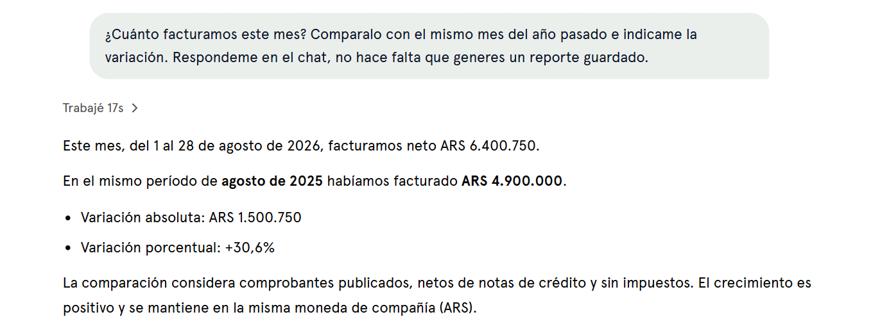
Use it wherever suits you
Tuqui has its own chat, ready from day one. And if you'd rather not leave the assistant you already use, it lives in there too.
Tuqui Chat
AvailableTuqui's own chat, AI included. No Claude or ChatGPT account needed.
Claude
AvailableAdd it as a tool from your Claude.ai account. A couple of clicks.
ChatGPT
AvailableUse it as a custom GPT from your OpenAI account.
MCP client
AvailableClaude Desktop, Cursor and any MCP-compatible client.
What a regular chatbot does not do
Intelligence is inter-legere — reading between the lines. Connecting dots no one connects. Tuqui does not return loose data: it understands your operation.
Crosses all your sources
Combines Odoo, Drive, Gmail, Slack and more in a single answer, without copy-pasting or opening five tabs.
Knows your vocabulary
It learns that "families" are your customer segments and that "the Tuesday route" is a specific set of deliveries.
Points out what you did not ask
When it answers, it looks around. If something stands out, it says so — without you needing to know what to ask.
Start free. Grow with you.
Try it without a card. When your team needs more, the upgrade is simple.
To try Tuqui from your Claude or ChatGPT, no credit card.
- Up to 3 users
- Works inside Claude, ChatGPT or any MCP client
- Limited queries
For people who need quick answers about their business, every day.
- Ask anything you need to know
- Tuqui's chat on the web and your phone, also from your Claude or ChatGPT
- For the whole team
For people who work alongside AI: analyse, build reports and present.
- Everything in Go, with more usage
- Analyses, reports and charts without running short
- Enough to work alongside AI all day
For people who want to automate processes and take efficiency to the next level.
- Everything in Plus, with the most usage
- Enough for scheduled tasks and agents running all day
- So AI can run your operation
* Every paid plan includes the same tools. What grows from one plan to the next is usage: how much AI (tokens) you can use per day. Priced per user, no minimum.
Frequently asked questions
Do I need a Claude or ChatGPT account to use Tuqui?
No. Tuqui has its own chat with the AI included: you log in, you ask, that's it. And if your team already lives inside Claude or ChatGPT, Tuqui works there too — the same business context, in the assistant you already have open.
What is Tuqui, in one line?
An intelligence layer on top of your Odoo. Not another dashboard and not a generic chatbot: it learns how your company works, connects data nobody would connect, and answers with the full picture. Technically it is also an MCP server — the standard assistants use to add tools — which is why you can take it into Claude, ChatGPT or Claude Code with nothing to build.
How is it different from other Odoo MCPs?
It isn't just a technical bridge. A generic MCP exposes your database and leaves you there; Tuqui adds company context, per-user context and skills built for Odoo, and on top of that it has its own chat with charts, tables and reports. That's why it doesn't return loose data: it understands what you're asking.
Do I need to install anything in Odoo?
No. No modules, no development work. A user with admin permissions can connect Odoo from Tuqui in a few steps and start testing without paying.
Which Odoo versions does it work with?
Tuqui works with Odoo 16, 17, 18, 19 and 20, both Community and Enterprise. It also works on Odoo Online, Odoo.sh and on-premise servers.
Is it safe? Can it modify my Odoo?
By default, Tuqui accesses Odoo in read-only mode. It is built to query, analyse and explain business data, not to change records unchecked. Credentials are protected and access stays bounded by the user's and the workspace's permissions.
How much does it cost?
There's a free plan for up to 3 users, no card required. Go is US$ 7 per user per month and adds Tuqui's chat on the web and your phone. Plus is US$ 25 and Max US$ 50 per user per month, with more usage. It's billed per user and you can mix plans in the same team.
Activate Tuqui in
less than 10 minutes.
No server installation needed. No meetings. No technical configuration.